


- Backups sit in a hidden, AWS-managed bucket you cannot inspect or download.
- You cannot export them across accounts or regions for disaster recovery.
- You cannot retain them past 14 days for audits or compliance.
- If someone deletes the domain, all automated snapshots vanish immediately.
Relying solely on AWS automated backups is a serious operational risk.
The answer is simple. Own the manual snapshots by storing them in your own Amazon S3 bucket and automate the entire lifecycle. This guide walks through our production pattern – covering IAM roles, the 403 permission gotcha, daily automation, and safe restores.
How It Works Under the Hood
OpenSearch requires no background agents or sync jobs. When you trigger a snapshot, the service assumes an IAM role you provide, connects directly to S3, and writes your Lucene index files into a prefix you define.
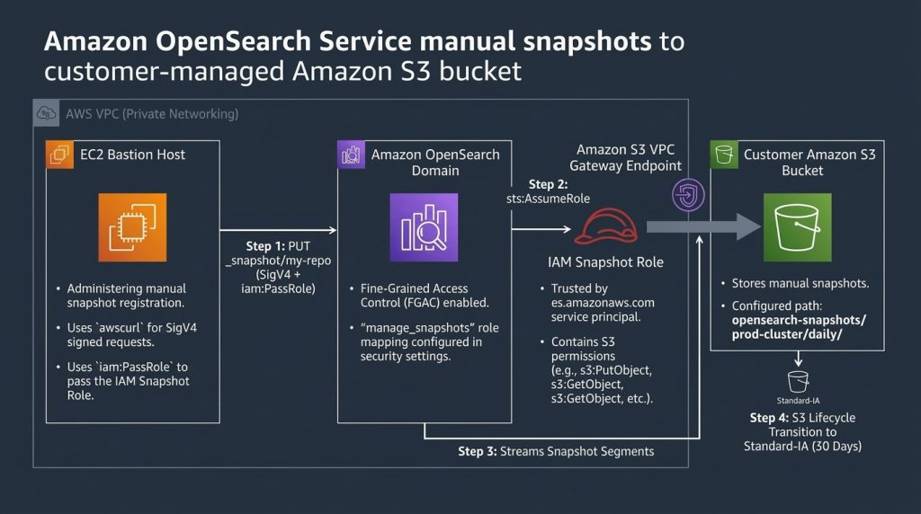
OpenSearch Manual Snapshot Architecture
In order for this to work, three things must align:
- Snapshot IAM Role: Trusted for OpenSearch (
es.amazonaws.com) with S3 read/write permissions. - Execution Role: The Bastion identity sending signed requests, granted
iam:PassRoleon the snapshot role. - OpenSearch Internal Security: Under FGAC, the execution role must be mapped to internal OpenSearch roles.
Step 1: Create the S3 Bucket (Avoid the Glacier Trap)
Create a dedicated S3 bucket in the same AWS region as your OpenSearch domain (e.g., my-opensearch-backup-bucket). In private VPCs, S3 Gateway Endpoints are strictly regional – buckets in other regions fail verification with Status Code: 301. Enable default encryption (SSE-S3) and configure lifecycle rules with care.
Why You Should Avoid S3 Glacier
Many teams attempt to cut costs by transitioning snapshots to Glacier. Do not do this.
OpenSearch requires instant, random read access to snapshot metadata and index chunks when verifying repositories or restoring data. If files reside in Glacier, repository checks fail and restores time out.
The recommended lifecycle approach:
- Store active snapshots in S3 Standard.
- Transition objects under
opensearch-snapshots/to S3 Standard-Infrequent Access (Standard-IA) after 30 days. You retain millisecond retrieval at much lower storage costs.
Step 2: The Two IAM Roles You Need
You need two distinct IAM roles: one for OpenSearch itself, and one for the machine executing registration commands.
1. The Role OpenSearch Assumes (opensearch-s3-snapshot-role)
Create an IAM role with this trust policy:
{
  "Version": "2012-10-17",
  "Statement": [
    {
      "Effect": "Allow",
      "Principal": { "Service": "es.amazonaws.com" },
      "Action": "sts:AssumeRole"
    }
  ]
}
Attach an inline policy granting permissions on your bucket:
{
  "Version": "2012-10-17",
  "Statement": [
    {
      "Effect": "Allow",
      "Action": ["s3:ListBucket"],
      "Resource": ["arn:aws:s3:::my-opensearch-backup-bucket"],
      "Condition": {
        "StringLike": { "s3:prefix": ["opensearch-snapshots/*", "opensearch-snapshots"] }
      }
    },
    {
      "Effect": "Allow",
      "Action": ["s3:GetObject", "s3:PutObject", "s3:DeleteObject"],
      "Resource": ["arn:aws:s3:::my-opensearch-backup-bucket/opensearch-snapshots/*"]
    }
  ]
}
2. Permissions for Your Bastion Host Execution Role
Registering snapshot repositories requires sending a signed HTTP request to OpenSearch. The calling role needs OpenSearch access and permission to pass the snapshot role:
{
  "Version": "2012-10-17",
  "Statement": [
    {
      "Effect": "Allow",
      "Action": ["es:ESHttpPut", "es:ESHttpGet", "es:ESHttpPost"],
      "Resource": ["arn:aws:es:us-east-1:123456789012:domain/my-opensearch-cluster/*"]
    },
    {
      "Effect": "Allow",
      "Action": "iam:PassRole",
      "Resource": "arn:aws:iam::123456789012:role/opensearch-s3-snapshot-role"
    }
  ]
}
Step 3: The Wall Everyone Hits (OpenSearch Internal Security)
This is where most engineers get stuck. After configuring IAM roles with iam:PassRole, sending the registration request from your Bastion returns:
{
  "error": {
    "root_cause": [{
      "type": "security_exception",
      "reason": "no permissions for [cluster:admin/repository/put] and User [name=arn:aws:iam::123456789012:role/ec2-ssm-role, ...]"
    }],
    "type": "security_exception",
    "status": 403
  }
}
Even with AWS AdministratorAccess, OpenSearch rejects the request.
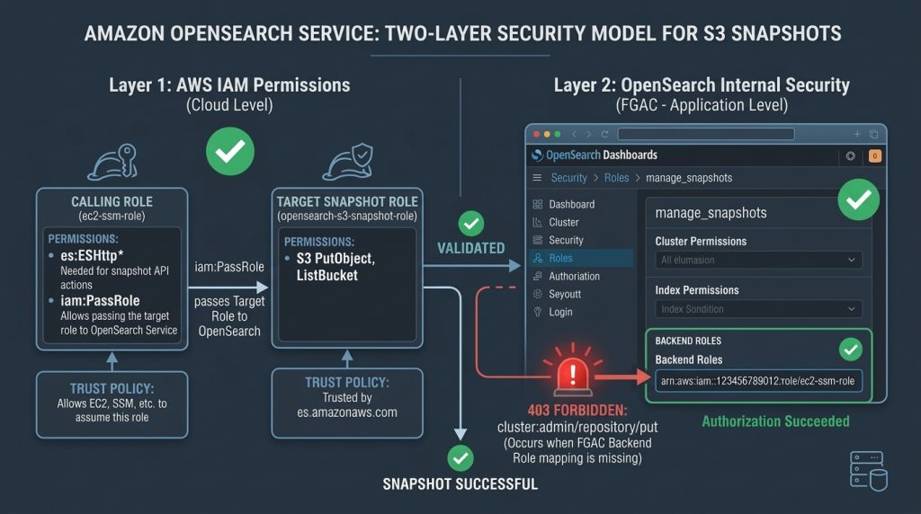
AWS IAM vs. OpenSearch Fine-Grained Access Control (FGAC)
When Fine-Grained Access Control (FGAC) is enabled, AWS IAM only authenticates identity; internal OpenSearch security authorizes actions. You must map your execution role to two built-in roles:
manage_snapshots: Allows registering repositories and manual snapshots/restores.snapshot_management_full_access: Allows creating and managing automated SM policies.
OpenSearch Dashboards (GUI)
- Navigate to Security → Roles.
- For both
manage_snapshotsandsnapshot_management_full_access, open Mapped users → Manage mapping, paste your execution role ARN under Backend roles, and click Map.
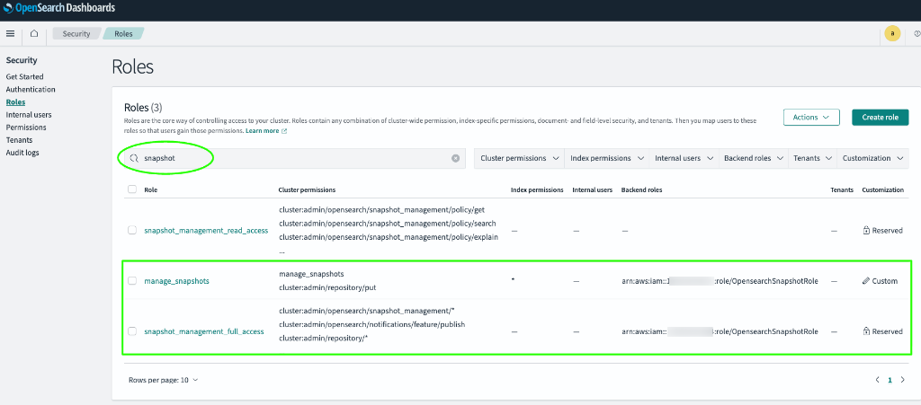
OpenSearch Roles Mapping
Step 4: Register the S3 Repository with awscurl
Because OpenSearch endpoints require AWS Signature Version 4 (SigV4) authentication, standard curl fails without signed headers. Use awscurl to sign HTTP requests using your instance credentials:
sudo yum install python3 python3-pip -y
sudo pip3 install awscurl
Register your repository:
awscurl -XPUT "https://search-my-opensearch-domain-xxxxxx.us-east-1.es.amazonaws.com/_snapshot/daily-snapshots"
  --service es
  --region us-east-1
  -H 'Content-Type: application/json'
  -d '{
    "type": "s3",
    "settings": {
      "bucket": "my-opensearch-backup-bucket",
      "base_path": "opensearch-snapshots/prod-cluster/daily",
      "region": "us-east-1",
      "endpoint": "s3.us-east-1.amazonaws.com",
      "role_arn": "arn:aws:iam::123456789012:role/opensearch-s3-snapshot-role"
    }
  }'
Two Critical Gotchas to Avoid:
- No Trailing Slashes on
base_path: Never endbase_pathwith a slash (useopensearch-snapshots, notopensearch-snapshots/), or OpenSearch creates double slashes (//) and verification fails. - The S3 301 Error: If you hit
Status Code: 301 (The bucket must be addressed using the specified endpoint), your S3 bucket resides in a different region. Private VPC S3 Gateway Endpoints cannot route cross-region—create the bucket in the same region as OpenSearch.
Verify that OpenSearch connects to S3:
awscurl -XGET "https://search-my-opensearch-domain-xxxxxx.us-east-1.es.amazonaws.com/_snapshot/_all"
  --service es
  --region us-east-1
If it returns {"daily-snapshots":{"type":"s3", ...}}, your cluster and S3 bucket are officially linked.
Step 5: Automate Daily Snapshots (No Lambda Needed)
Historically, automating snapshots required custom Lambda functions. OpenSearch includes a native Snapshot Management (SM) plugin that handles schedules and retention on-cluster (enabled by the snapshot_management_full_access role mapped in Step 3).
Create the automated daily policy:
awscurl -XPOST "https://search-my-opensearch-domain-xxxxxx.us-east-1.es.amazonaws.com/_plugins/_sm/policies/daily-snapshot-policy"
  --service es
  --region us-east-1
  -H 'Content-Type: application/json'
  -d '{
    "description": "Daily automated snapshot policy to S3 with 7-day retention",
    "creation": {
      "schedule": {
        "cron": {
          "expression": "0 20 * * *",
          "timezone": "UTC"
        }
      },
      "time_limit": "1h"
    },
    "deletion": {
      "schedule": {
        "cron": {
          "expression": "0 21 * * *",
          "timezone": "UTC"
        }
      },
      "condition": {
        "max_age": "7d",
        "max_count": 7,
        "min_count": 1
      },
      "time_limit": "1h"
    },
    "snapshot_config": {
      "repository": "daily-snapshots",
      "indices": "*",
      "date_format": "yyyy-MM-dd-HH-mm",
      "timezone": "UTC",
      "include_global_state": true
    }
  }'
Every night at 20:00 UTC, OpenSearch snapshots all indices to S3. At 21:00 UTC, it purges snapshots older than the last 7. The lifecycle runs completely hands-free.
Step 6: Testing a Safe Restore (The Index Renaming Trick)
A backup strategy you have never tested is only a guess. Run these commands directly in OpenSearch Dashboards → Dev Tools (Console tab) or via awscurl from your Bastion.
When restoring, avoid overwriting live data by restoring into isolated test indices using rename_pattern and rename_replacement with wildcards via the Snapshot Restore API.
1. Run an on-demand snapshot (supports wildcards):
PUT _snapshot/daily-snapshots/manual-test-snapshot
{
  "indices": "application-logs-*,service-logs-*",
  "ignore_unavailable": true,
  "include_global_state": false
}
(Tip: Use *,-.* to snapshot all indices while excluding hidden system indices).
2. Restore multiple indices with pattern renaming:
You do not need to list indices individually. Use wildcards to restore all matching indices at once:
POST _snapshot/daily-snapshots/manual-test-snapshot/_restore
{
  "indices": "application-logs-*",
  "rename_pattern": "(.+)",
  "rename_replacement": "$1_restored",
  "include_global_state": false
}
OpenSearch restores chunks into *_restored indices. Verify document counts with GET _cat/indices/*restored*?v, then delete test indices (DELETE *restored) without risking production data.
Key Takeaways from the Trenches
- Organize S3 Paths Cleanly: Structure paths like
opensearch-snapshots/<env>/<service>/for clean audits and replication. - Consolidate Small Shards: Snapshots run per shard; thousands of tiny shards cause CPU spikes. Consolidate small indices.
- Cross-Account Restores: Since snapshot files reside in standard S3 buckets, migrations simply require granting the target account’s OpenSearch role read access to your bucket.
Wrapping Up
AWS automated snapshots provide a short-term rollback window, but customer-managed S3 snapshots give you genuine data ownership.
Once configured, your backups are portable, your retention policies are automated, and your disaster recovery strategy is real.
All policy templates, shell scripts, and Dev Tools commands are available on GitHub.