


Kubernetes has the ability to offer a highly capable Horizontal Pod Autoscaler (HPA), which can be used to auto-scale the number of replicas according to the utilization of resources. In most instances, it is sufficient to consider only CPU and memory to perform this operation. Nevertheless, there might be instances when the resource utilization does not necessarily show the load that the application is facing especially if it is accessible via API or Web services.
The application could experience a sudden increase in its traffic and yet the CPU would not have increased significantly. Additionally, response times could become slower by the application even when CPU and memory stay within acceptable levels.
That is where we will require KEDA (Kubernetes Event-driven Autoscaling).
Combining KEDA with Prometheus can provide a solution to scale applications using metrics other than resource usage.
In this approach, four metrics are considered:
- CPU utilization
- Memory utilization
- Request rate
- Request latencyThe first two represent resource utilization, while the latter two represent application-level behavior.
Why Go Beyond CPU and Memory?
Consider an API service receiving increasing traffic:
CPU 45%
Memory 55%
Requests/sec 250
P90 latency 750 ms
From a CPU and memory perspective, the application appears healthy.
However, the latency indicates that users may already be experiencing slow responses.
If the autoscaler only looks at CPU and memory, it may not scale the workload because neither resource has crossed its threshold.
Application metrics provide another perspective:
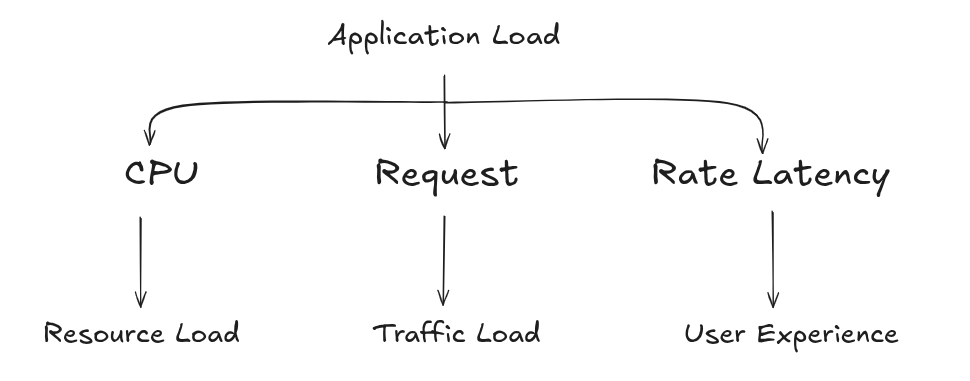
This makes the autoscaling decision more representative of the actual workload.
KEDA and Prometheus Architecture
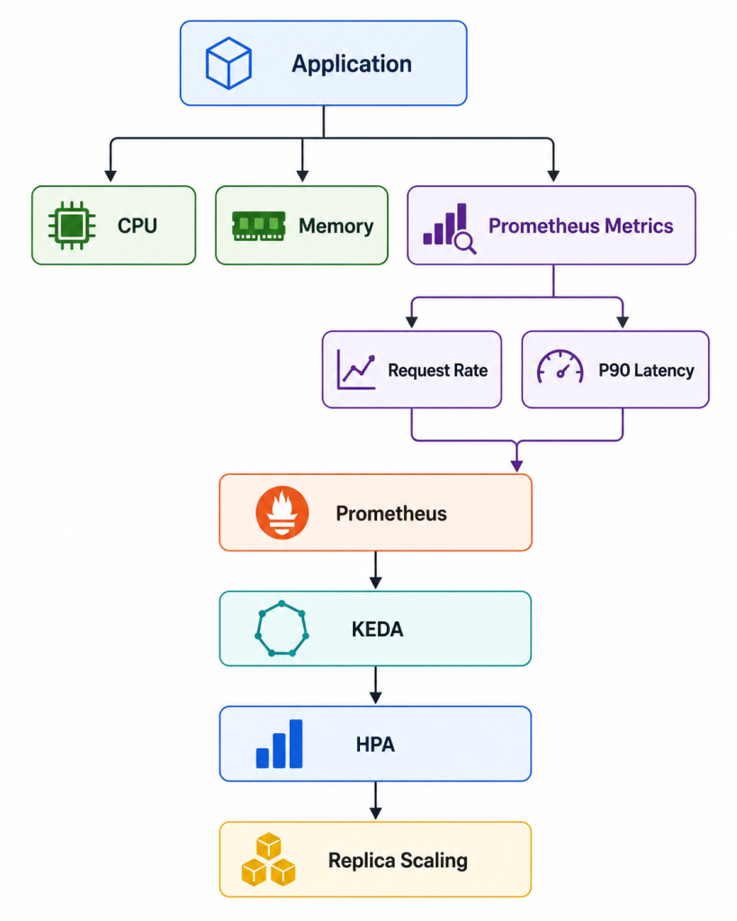
KEDA works alongside Kubernetes HPA. Prometheus collects application metrics, KEDA evaluates those metrics, and the resulting scaling information is used by HPA to determine the desired number of replicas.
A simplified architecture looks like this:
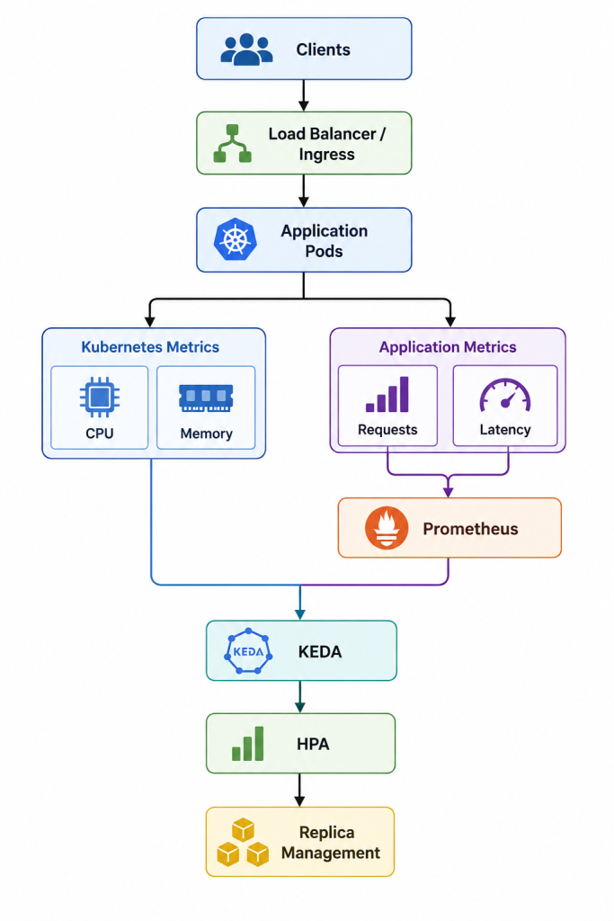
The key advantage is that KEDA allows external metrics, such as Prometheus metrics, to participate in Kubernetes autoscaling.
Scaling Using Four Metrics
The implementation combines two Kubernetes resource metrics with two Prometheus application metrics.
CPU and Memory
CPU and memory remain useful because they indicate resource pressure inside the pods.
For example, the CPU trigger can be configured with a target utilization of:
- type: cpu
  metricType: Utilization
  metadata:
    value: "70"
Similarly, memory can use:
- type: memory
  metricType: Utilization
  metadata:
    value: "70"
This gives us a baseline resource-based scaling mechanism.
However, the more interesting part is the application-level metrics.
Request Rate
Instead of looking only at total requests, the request metric can be normalized by the number of ready pods.
A generic Prometheus query looks like:
sum(
  rate(
    http_requests_total{
      service="my-service"
    }[2m]
  )
)
/
count(
   kube_pod_status_ready{
     namespace="my-namespace",
     pod=~"my-service-[0-9].*",
     condition="true"
  }
)
The important concept here is:
Total requests/sec
——————
Ready pods
This gives an approximate requests-per-second-per-pod value.
For example, if the application receives:
10 requests/sec
and has:
2 ready pods
then:
10 / 2 = 5 requests/sec/pod
This is more useful for capacity-based scaling than simply looking at the total request count.
A target can then be configured, for example:
1 request/sec/pod
The actual threshold should be determined through load testing rather than choosing an arbitrary value.
Request Latency
The second application-level metric is latency.
When Prometheus collects latency as a histogram, we can calculate a percentile using histogram_quantile.
For example:
histogram_quantile(
  0.90,
  sum(
    rate(
      http_request_latency_ms_bucket{
        service=~"my-service"
      }[2m]
    )
 ) by (service, le)
)
This calculates the P90 latency.
If the query returns: 100
and the underlying metric is measured in milliseconds, the P90 latency is: 100 ms
A threshold can then be configured at: 100 ms
The purpose of using P90 rather than average latency is to capture the behavior of the slower portion of requests.
For example:
Average latency = 80 ms
P90 latency = 250 ms
The average might suggest that everything is healthy, while P90 indicates that a significant portion of requests are considerably slower.
How KEDA Uses the Metrics
The four signals can be thought of as different indicators of application pressure:
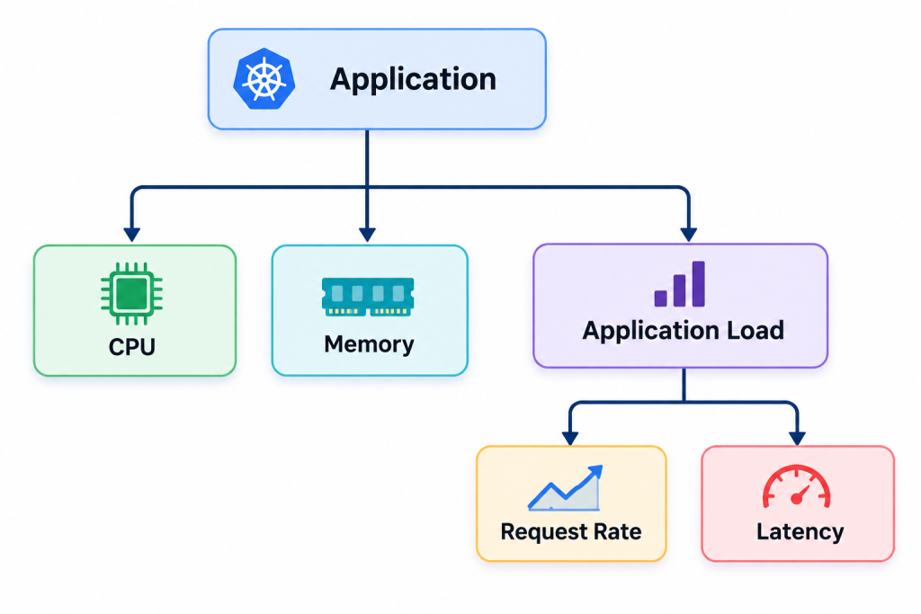
For example, consider:
CPU = 45%
Memory = 50%
Request rate = 4 req/sec/pod
P90 latency = 180 ms
With targets of:
CPU = 70%
Memory = 70%
Request rate = 1 req/sec/pod
P90 latency = 100 ms
CPU and memory are within their targets, but both application-level metrics are above their configured thresholds.
This gives the autoscaling system an indication that the workload may require additional capacity even though the traditional resource metrics do not show significant pressure.
On the other hand, consider:
CPU = 85%
Memory = 80%
Request rate = 0.7 req/sec/pod
P90 latency = 90 ms
In this case, traffic and latency look healthy, but resource utilization is high.
The CPU and memory metrics provide the scaling signal.
This is the main benefit of combining different types of metrics: different metrics can identify different types of workload pressure.
Controlling Scale-Up and Scale-Down
Autoscaling is not only about deciding when to add pods. It is equally important to control how quickly pods are removed.
KEDA allows the underlying HPA behavior to be customized.
A typical configuration can use a relatively aggressive scale-up policy:
scaleUp:
  stabilizationWindowSeconds: 30
  policies:
    - type: Percent
      value: 100
      periodSeconds: 15
    - type: Pods
      value: 2
      periodSeconds: 15
This allows the application to respond quickly when there is a sudden increase in demand.
Scale-down can be more conservative:
scaleDown:
  stabilizationWindowSeconds: 60
  policies:
    - type: Percent
      value: 100
      periodSeconds: 15
    - type: Pods
      value: 1
      periodSeconds: 60
The idea is simple:
Scale Up → Fast response
Scale Down → Controlled response
This helps reduce the possibility of autoscaling flapping, where pods are repeatedly added and removed because of short-lived metric fluctuations.
KEDA’s polling and cooldown settings also influence this behavior. For example:
pollingInterval: 10
cooldownPeriod: 60
means KEDA evaluates external metrics at a relatively short interval while maintaining a cooldown period before scaling down.
These values should be tuned according to the application’s traffic pattern and startup time.
Important Considerations
Using more metrics does not automatically mean better autoscaling. The metrics need to represent meaningful application behavior.
Choose thresholds based on testing
Suppose load testing produces:
Traffic P90 Latency
————————-
10 req/sec 60 ms
20 req/sec 70 ms
50 req/sec 95 ms
75 req/sec 140 ms
100 req/sec 220 ms
If the target P90 latency is 100 ms, the application is already approaching its comfortable capacity around 50–75 requests/sec.
This information can help determine an appropriate request-rate-per-pod threshold.
Monitor downstream dependencies
Scaling application pods can also increase traffic to downstream systems:
Application
│
├── Database
├── Cache
├── Message Queue
└── External APIs
If latency is caused by an overloaded database, simply adding application pods may not solve the problem.
In some situations, it can actually make the problem worse by generating more database connections and queries.
Therefore, autoscaling should be evaluated together with downstream metrics.
Configure a sensible replica range
A typical configuration might look like:
minReplicaCount: 1
maxReplicaCount: 10
The actual values depend on application capacity and infrastructure limits.
One important point is that if:
minReplicaCount: 1
maxReplicaCount: 1
then horizontal scaling cannot occur regardless of how high the metrics become.
The maximum replica count must therefore be greater than the minimum if actual autoscaling is required.
Monitoring the Autoscaling Behavior
A good monitoring setup should provide visibility into both the metrics and the scaling decisions.
Useful metrics include:
Application:
– Request rate
– P50 latency
– P90 latency
– P99 latency
– Error rate
Kubernetes:
– CPU utilization
– Memory utilization
– Ready pods
– Current replicas
– Desired replicas
Autoscaling:
– KEDA metrics
– HPA metrics
– Scale-up events
– Scale-down events
This allows us to correlate an increase in traffic with the resulting scaling decision.
For example:
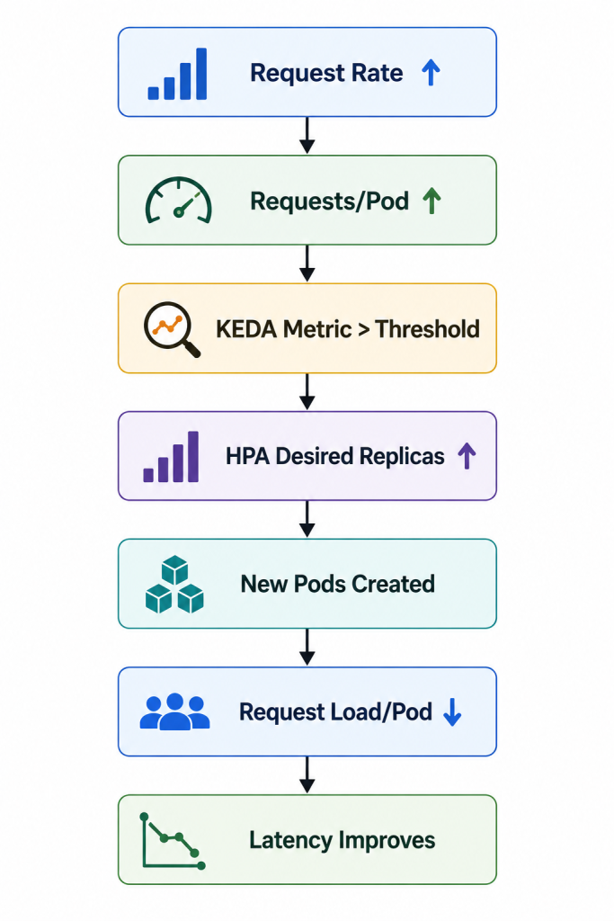
This is the behavior we ultimately want from an application-aware autoscaling system.
Conclusion
KEDA provides a powerful way to extend Kubernetes autoscaling beyond traditional CPU and memory metrics.
By combining:
CPU Utilization
+
Memory Utilization
+
Request Rate per Pod
+
P90 Request Latency
we can create an autoscaling strategy that considers both resource utilization and actual application behavior.
CPU and memory tell us whether pods are under resource pressure. Request rate tells us how much traffic each pod is handling, while latency provides visibility into the application’s response time.
The combination creates a more complete picture:
The key to a successful implementation is not simply adding multiple metrics. The thresholds need to be defined based on load testing, production monitoring, and capacity management, along with accounting for downstream dependencies.
With proper thresholds and scale-up/scale-down behavior, KEDA can help to make the Kubernetes autoscaling very responsive to real application demand.